What Is a Printing Device and Which Type Is Best?

A Printing Device turns digital information into a physical result, such as a document, label, photograph, or receipt. It may use ink, toner, heat, or specialized materials. The familiar desktop printer is only one example. Multifunction printers can also scan, copy, and send documents.

The best type depends on how the device will be used. An inkjet printer often suits colorful images, occasional home printing, and modest budgets. A laser printer usually handles frequent text printing faster, with sharper pages and lower running costs. Thermal printers work well for labels and receipts, but they may require special paper. Speed matters. So does paper size.

Look beyond the purchase price.

A reliable choice should match monthly volume, connection options, maintenance needs, and replacement supply costs. Manufacturer specifications provide useful evidence, but real-world performance can vary with paper quality and software settings. Independent testing and user reviews can reveal noise, smudging, setup problems, or inconsistent wireless connections. Those details matter beside a busy desk.

I have seen people choose a printer because it was inexpensive, then discover that replacement cartridges cost more than expected. That mistake is easy to repeat. A careful comparison should include several years of ink, toner, paper, electricity, and service expenses. Environmental impact also deserves attention, including duplex printing and cartridge recycling.

There is no perfect answer.

This guide explains how each Printing Device type works and where it performs best. It also considers practical limitations, so readers can choose with clearer expectations rather than attractive promises.
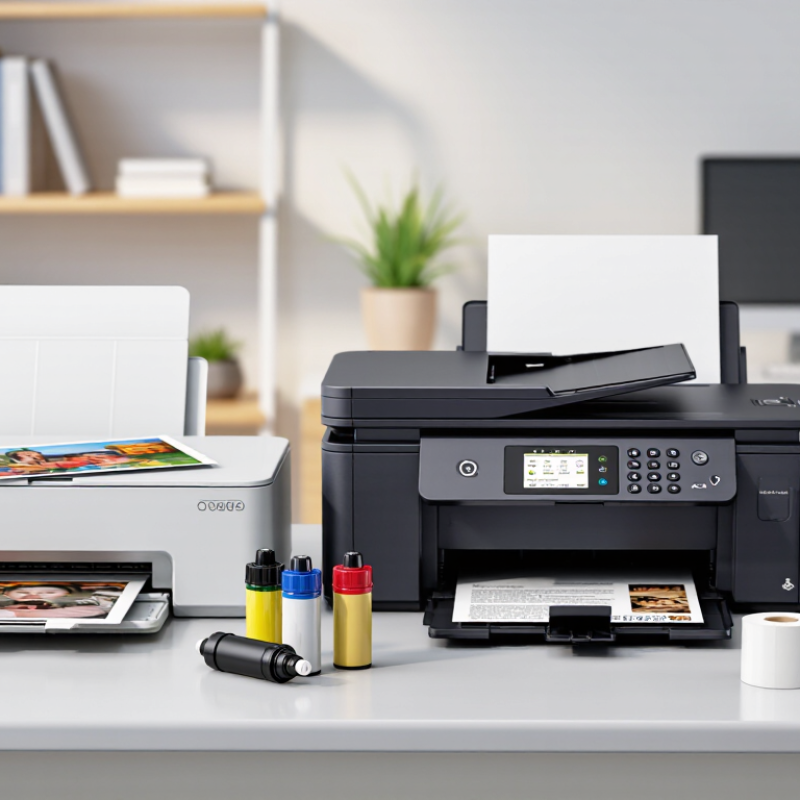
What Is a Printing Device and Which Type Is Best?

Definition and Core Functions of a Printing Device

What Is a Printing Device and Which Type Is Best?

A printing device converts digital information into a physical image or document. Its core functions include data reception, image processing, media handling, and output control. A typical device receives a file through a wired or wireless connection. Its controller then converts text and graphics into printable patterns. The mechanism places ink, toner, or another medium onto paper, film, labels, or specialized materials. Some devices also scan, copy, store, and transmit documents. These functions make a multifunction device useful in busy offices. However, extra features can increase maintenance needs and operating costs.

The best type depends on volume, material, speed, and image quality. Ink-based systems suit detailed color images and small production runs. Toner-based systems often handle fast office documents and sharp text. Production devices support heavier workloads, while thermal systems work well for labels and receipts. IDC’s Worldwide Quarterly Hardcopy Peripherals Tracker reported a 17.6% year-over-year shipment decline in the first quarter of 2024. This decline reflects changing workflows, not disappearing print demand. Smithers’ industry research also identifies continued growth in digital printing applications, especially packaging and customized materials. The figures are useful, but market averages cannot predict every workplace.

Tips: Measure monthly pages before choosing a device. Check duplex speed, media compatibility, and service access. Calculate consumables, energy, and waste together. A cheaper purchase price can mislead. In practice, paper jams and poor software support often create greater costs than expected. The definition seems simple, yet the right choice requires testing real files, paper sizes, and daily workloads.

How Printing Devices Create Physical Copies

A printing device converts digital information into a physical copy. The process begins when software sends text or images to a print controller. That controller translates the file into tiny dots, lines, and color instructions. The device then places material onto paper, film, labels, or other surfaces.

Inkjet devices spray microscopic liquid droplets through controlled nozzles. The paper may feel slightly damp after dense images. Laser and electrophotographic devices use electrostatic charges to attract dry toner. Heat then fuses the powder into the paper fibers.

Thermal printers apply heat directly or through a transfer ribbon. The result is fast, quiet, and useful for receipts or labels, but some thermal output can fade under sunlight.

The best type depends on workload, surface, speed, and image detail. Smithers estimated the global digital print market at about $136.7 billion in 2022, showing strong demand for short, customized runs. In contrast, IDC’s Worldwide Quarterly Hardcopy Peripherals Tracker has repeatedly recorded long-term shipment pressure in traditional office printing. That matters. Buying for volume alone can mislead. For sharp text and frequent documents, electrophotographic systems usually perform well. For photographs and changing artwork, inkjet systems offer smoother tonal transitions. Field technicians also check drying time, paper compatibility, and maintenance access before recommending a device. Small details matter. My own practical view is less tidy: the “best” printer can still disappoint when humidity, unsuitable paper, or neglected cleaning changes the physical result.

Major Types of Printing Devices and Their Differences

A printing device turns digital information into a physical record. The best type depends on volume, material, color needs, and operating conditions.

In a small office, an inkjet device handles photographs and occasional color documents well. It sprays tiny liquid droplets onto coated or plain paper. The results can look vivid, but unused ink may dry in the nozzles. That detail is easy to overlook.

Laser devices use toner and heat, making them practical for frequent text printing. They usually deliver sharp letters, fast pages, and predictable running costs. However, color images may appear less natural than inkjet output on suitable photo paper.

A thermal printer uses heat-sensitive paper or a transfer ribbon. It is common for receipts, labels, and compact records because it needs little liquid maintenance.

Paper choice matters greatly. Direct thermal paper can fade with heat, sunlight, or long storage.

Dot matrix devices strike an inked ribbon, so they remain useful for multipart forms and harsh work areas. They are noisy and less detailed, but their impact mechanism can print through layered forms.

Three-dimensional printers build objects layer by layer from digital models. They suit prototypes, fixtures, and educational projects, yet surface quality and strength vary by material.

Measured page yield, duty cycle, and maintenance needs often reveal more than advertised speed. I once underestimated paper handling, and repeated jams changed the cost calculation.

Key Factors for Choosing the Best Printing Device

A printing device converts digital files into physical pages, labels, images, or other media. The best choice depends on how, where, and how often you print. A small home office may need a compact device for invoices and occasional reports. A busy workplace may require faster output, larger paper capacity, and dependable network access.

Start with print volume and document type. Check the recommended monthly workload, not only the maximum speed. A device running near its limit may produce heat, noise, and frequent maintenance. Print quality also matters. Text documents need sharp edges, while photographs require accurate color and smooth shading. Confirm the supported paper sizes, weights, and finishes before buying. I once overlooked paper thickness, and the device struggled with every heavier sheet.

Operating cost deserves careful attention. Compare energy use, replacement supplies, maintenance parts, and the cost per page. A lower purchase price can become expensive after several months. Automatic two-sided printing can reduce paper waste, while a sleep mode may lower energy consumption. Security features are important for shared offices, especially when documents contain personal or financial information. Look for user authentication, protected connections, and secure file deletion. Connectivity should fit real work habits, including wired networks, wireless access, or direct mobile printing. Specifications help, but actual workflow testing is better. A device can look impressive on paper and still feel inconvenient beside a crowded desk.

What Is a Printing Device and Which Type Is Best? - Key Factors for Choosing the Best Printing Device

Printing Device Type How It Works Typical Print Speed Best For Print Quality Color Capability Typical Initial Cost Key Advantages Main Limitations
Inkjet Printer Sprays tiny droplets of liquid ink onto paper through a printhead. Approximately 5–20 pages per minute for standard documents. Home users, photographs, school projects, and occasional color printing. Excellent color gradients and detailed image reproduction on suitable paper. Usually available in full color. Generally low to moderate. Strong photo quality, compact designs, and flexible media support. Ink may dry during long periods of non-use; document printing can be slower than laser printing.
Laser Printer Uses a laser or LED imaging system to fuse powdered toner onto paper. Approximately 15–50 pages per minute, depending on the model and document type. Offices, workgroups, and users with frequent text-document printing. Very sharp text and consistent graphics; photo quality is usually less natural than inkjet output. Available in monochrome and color configurations. Moderate to high. Fast output, efficient high-volume printing, and toner that does not dry out. Higher purchase cost; color models and replacement components may be expensive.
All-in-One Printer Combines printing with scanning and often copying and document handling. Approximately 8–35 pages per minute, depending on the printing technology. Home offices and small businesses that need several document functions. Depends on whether the device uses inkjet or laser technology. Monochrome or color. Low to high, depending on features. Saves space and combines several common office functions in one device. More components can increase maintenance needs; a single fault may affect multiple functions.
Thermal Printer Uses heat to create an image on heat-sensitive paper or to transfer ink from a ribbon. Approximately 50–300 millimeters per second for many receipt and label applications. Receipts, shipping labels, barcodes, tickets, and point-of-sale environments. Clear text and barcode output; image quality depends on the thermal method and media. Mostly monochrome, with limited specialty color applications. Low to moderate. Fast, quiet, and often does not require liquid ink or toner. Direct-thermal prints can fade with heat, light, or friction; output is usually specialized rather than general-purpose.
Dot Matrix Printer Uses pins to strike an inked ribbon and form characters from a dot pattern. Approximately 200–600 characters per second, depending on the model and print mode. Multi-part forms, invoices, warehouse documents, and environments requiring impact printing. Functional text and basic graphics; lower resolution than modern inkjet and laser devices. Usually monochrome, with limited color options. Moderate. Can print through multipart forms and operates reliably in demanding work environments. Noisy, slower for high-quality documents, and less suitable for photos or modern office presentation materials.
Portable Printer Uses compact inkjet, thermal, or dye-sublimation technology for mobile printing. Approximately 1–10 pages per minute, depending on the technology and connection. Travel, field work, mobile receipts, small documents, and occasional printing. Ranges from basic document output to high-quality small photographs. Monochrome or color. Moderate to high for the available print area. Small size, battery operation on some models, and convenient wireless connectivity. Limited paper capacity, smaller output formats, and higher cost per page in some cases.

Selection guidance: Choose an inkjet device for high-quality color and photo printing, a laser device for fast and frequent document printing, an all-in-one device for multifunction needs, a thermal device for receipts or labels, and a dot matrix device for multipart forms. Compare print volume, running cost, connectivity, paper size, maintenance requirements, and available workspace before making a final decision.

Common Uses and Maintenance Requirements by Printer Type

A printing device turns digital files into physical records, but its best use depends on the work. Inkjet printers suit color photos, school projects, and occasional home documents. Their nozzles can dry when unused, so print a small color test page every week. Use the correct paper, keep cartridges sealed, and wipe dust from the feed rollers. Simple care matters.

Laser printers handle high-volume text, invoices, and shared office queues efficiently. They need clean paper paths, proper toner handling, and periodic replacement of worn rollers. Keep ventilation clear because heat builds during long print runs. A faint stripe may indicate a dirty optical area, uneven toner, or a damaged drum. Do not guess too quickly. Check the device guide and isolate one cause at a time.

Thermal printers work well for receipts, labels, and warehouse records because they use heat-sensitive media. Keep their print heads free of adhesive and store thermal rolls away from sunlight. Direct thermal labels may fade, making them unsuitable for permanent archives. Impact printers remain useful for multipart forms and rough environments, although they are noisy and slower. Replace ribbons before characters become pale, and remove paper scraps from the tractor path. Maintenance should follow page volume, dust levels, and paper quality, not habit alone. I sometimes over-clean equipment, which can waste time or damage delicate parts. That is a useful reminder.

What Is a Printing Device and Which Type Is Best?

Common uses and maintenance requirements by printer type

The suitability index uses a practical 1–5 scale, where 5 indicates a strong fit for the listed task. Inkjet printers are well suited to color images and photos, laser printers are optimized for fast text-document production, and thermal printers are commonly used for receipts and labels.

Inkjet Printers

Common uses include home documents, graphics, and photo printing. Regular nozzle cleaning and timely ink replacement help prevent blocked printheads.

Laser Printers

Common uses include office documents and high-volume text printing. Maintenance usually involves replacing toner and periodically cleaning the paper path.

Thermal Printers

Common uses include receipts, shipping labels, and barcodes. Cleaning the printhead and platen helps maintain clear, consistent output.

You've just added this product to the cart:

0
    0
    Your Cart
    Your cart is empty